Yiwei Sang
Home/Work/About
Let’s Create Something Together
sangqiqi1001@gmail.com
The Challenge
Turning a functional AI prototype into a production-ready product: designing the experience layer that the model alone can't provide.
Role:
Product designer & Design Engineer
Duration:
Ongoing — iterating with the client team
Documentation
https://github.com/sangyiw/salescompass-case-study
Where this started
"If the boss isn't in the room, the deal doesn't close. If the boss goes on holiday, clients stop picking up."
During the exploration phase, I worked closely with the team and the client to clarify the business problems before making any product decisions. The core finding was simple: critical operational knowledge existed entirely in the form of tacit intuition, locked within a single individual and unable to be transferred or scaled.
This framework shaped all subsequent work. The design challenge was not ‘to build a CRM system’, but rather: how could we make tacit knowledge machine-readable—and thereby create a user experience that people truly trust and are willing to act upon?
Framing the design problem
Discovery gave us enough to define two distinct design challenges — each one requiring a different kind of solution.
Tacit knowledge — unstructured, non-transferable
Design challenge 01
Surface risk before it's visible
Risk signals exist in the data — but without a system, they're invisible until too late. The AI needs to detect patterns and surface them in a way the user immediately understands and trusts.
Design challenge 02
Turn insight into a clear next action
Showing a risk score isn't enough. The interface must translate AI output into a specific, confident recommendation — so the user knows exactly what to do, without guesswork.
These two challenges defined the product spec: an AI system that detects risk automatically and prescribes the next action precisely — shifting the entire workflow from reactive to proactive.
What was I working with — and what was missing?
Defining Design
From the problem framing, two core AI capabilities emerged — each addressing one design challenge directly.
01
AI Screening — surface risk before it's visible
Automatically clean and analyse client data to flag churn risk, engagement drops, and opportunity signals. Replace gut feel with evidence — so attention goes to the right accounts at the right time.
02
Contact Recommendation — from insight to action
For each flagged client, AI generates a specific outreach recommendation: timing, channel, and suggested approach. Turns a risk signal into a concrete next step — no guesswork required.
WHY THESE TWO FEATURES TOGETHER
Screening without recommendation creates awareness with no action. Recommendation without screening creates noise with no priority. Together, they form a closed loop: the AI identifies who needs attention and tells the salesperson exactly what to do — shifting the entire workflow from reactive to proactive.
The PM's prototype — what it got right, and what it missed
The prototype validated the AI logic. But it isn't a product. The experience layer — information hierarchy, state management, adaptive layout, feedback loops — was entirely missing. This is where the Design Engineer's work began.
WHAT WORKED
-AI data cleaning pipeline was functional
-Script recommendation logic was generating real output
-Proved the technical feasibility of the AI approach
WHAT IT MISSED
-No information hierarchy for complex B2B data
-No feedback loop: how do user actions improve the model over time?
-No sense of priority — all clients looked equally urgent
How did I actually build it?
Three technical challenges to solve simultaneously
Technical challenge 01
Dynamic UI — interface that follows AI output
The AI's reasoning varies with every client: confidence level, risk tier, data completeness. The interface had to adapt its layout and visual weight accordingly — static components weren't sufficient.
Technical challenge 02
Design assets as AI-readable metadata
Figma pixel specs can't be consumed by AI agents. The design system had to be rebuilt as structured JSON tokens — so the AI could generate and adapt UI autonomously across platforms.
Technical challenge 03
Extreme resource constraints
A tiny team, hard deadline, zero quality compromise. Every hour of human effort needed to be multiplied. AI had to handle volume; expert judgement had to handle quality.
Reverse engineering the product with Claude
01
Input: the PM's Coze prompts as raw material
I extracted the underlying prompt configurations and workflow logic from the PM's Coze build — not the surface chatbot, but the actual reasoning structure underneath. This became the context for reconstruction.
02
Multi-turn prompt chaining with Claude — rebuilding the product spec
I ran a structured reverse engineering session with Claude — using the discovery insights and the PM's logic as input, guiding Claude through multi-round prompts to reconstruct a proper AI-native product spec.
Human-AI collaboration state machine
AI auto-recommends → user reviews and adjusts → one-click outreach action
Defining Interaction Rules
what the interface renders for each AI confidence tier: high risk, low risk, uncertain, data-missing
Feedback loop architecture
how user actions return as training signal to continuously improve recommendation quality
03
Output: structured reverse PRD
A specification document that clarified the PM's functional boundaries,and laid the structural foundation for the design system that followed.
Making the design system AI-consumable
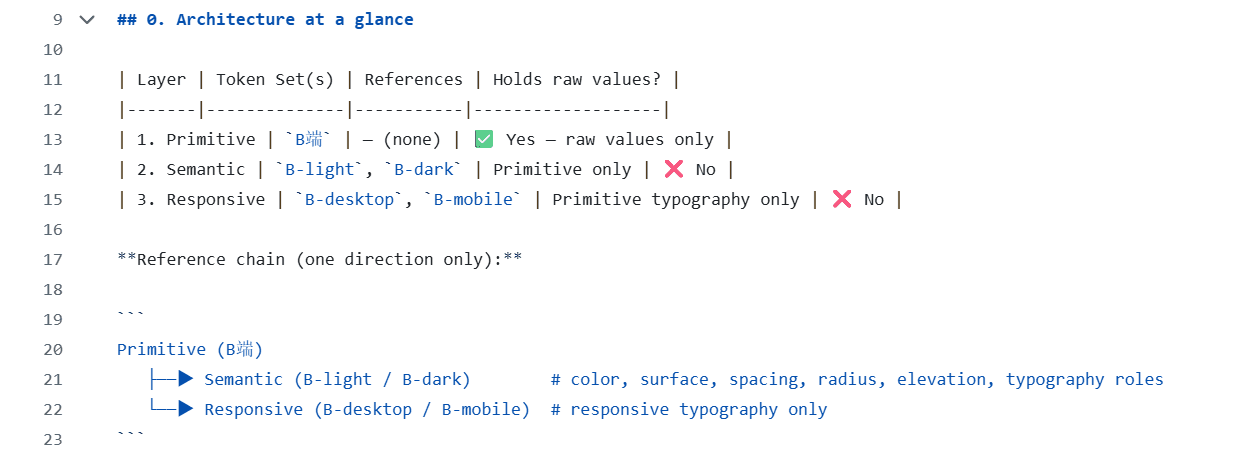
A Figma pixel spec is invisible to an AI agent. The design system had to exist as structured metadata first — so it could be read, referenced, and generated by AI at every stage.
Semantic Design Tokens in JSON
I fed brand positioning, spacing rules, and WCAG 2.1 AA accessibility requirements into AI, generating a W3C-compliant token set in JSON. These tokens are the single source of truth — controlling Figma, code, and AI-generated components from one file.
When the theme changes, the AI reads the token and regenerates all affected components across all platforms — no designer required for updates.


Claude Code`` + Figma Make — batch generation + Quality Gate
AI handled
Component variant generation
Token application across all states
Multi-platform asset export
I handled
Corrections to long text and edge cases
Responsive design adjustments for different devices
Review of interaction state integrity
I changed
南
客户A
09:23
张晓明
暂缓
聊了端午备货,当场确认下单
这条记录已修正 AI 下次评分 · 查看依据
后续:待再次联系
AI handled
南
客户A
09:23
张晓明
暂缓
聊了端午备货,当场确认下单
这条记录已修正 AI 下次评分 · 查看依据
后续:待再次联系
Wiring design back into the AI workflow
The UI Schema defined in the product spec became Coze workflow configuration parameters — so the AI's reasoning output directly drives what the interface renders, for which user type.
Figma Make: Quickly Build the Home Page
For the core process pages (customer list, risk dashboard, recommended action cards), we used Figma Make directly to generate the first draft in bulk using tokens and a component library, thereby validating the overall structure and visual density. The process was extremely fast and naturally integrated with tokens.

Coze: Direct front-end reproduction
Convert the Design Token JSON into Coze’s UI Schema configuration parameters; the AI’s inference output (risk level, confidence score, recommended action) directly drives front-end rendering—which components appear, their visual weighting, and what layout is triggered are all determined by the Schema rules, eliminating the need for engineers to manually write conditional logic.
A
客户A
最近进货20天前
待联系
95%
B
客户B
最近进货20天前
跟进中
65%
C
客户C
最近进货20天前
已联系
65%
Remaining pages: Modify step by step in strict accordance with the system
Pages that cannot be overridden in Figma Make (such as settings, error states and low-fidelity fallback interfaces) are designed manually in Coze, whilst strictly adhering to the defined token and component libraries—no new colour values are introduced, the spacing system is not bypassed, and each screen is checked against the Design System to ensure consistency across the product’s visual language.
Closed-loop feedback
Every action a salesperson takes — accepting, modifying, or rejecting a recommendation — returns asynchronously as training data. The model improves with every client interaction.
AI recommendation
Salesperson action
Async return
Model retraining
Record the results of the contact
What can I show for it?
Proving engineering capability under NDA
This project is under NDA. The business-sensitive code and configurations can't be shared publicly. But I extracted the underlying technical infrastructure — everything that doesn't contain business logic — and published it as open source.
AI-Design-System-Prompts/
Prompt templates for Design Tokens
Templates I developed for making LLMs generate accurate, WCAG-compliant Design Tokens — including edge case handling and semantic naming for multi-user systems.
Tokens-to-Schema-Script/
Figma Tokens → Coze UI Schema
A lightweight script (written with Claude) that converts Figma Token JSON into the UI Schema config that Coze agents consume directly. The missing bridge between design and AI workflow.
README.md
Full workflow documentation
Usage spec, configuration guide, and best practices for the complete AI-driven design workflow — from token generation through agent integration.
What the workflow unlocked
Product development cycle
Claude reverse-engineers from existing prototype logic
Days → Hours
Design asset generation
Figma Tokens + Claude auto-generation
Cross-platform consistency
Token assets auto-parsed per platform
100%
dynamic fidelity
Team scale required
1 Design Engineer + AI across all layers
The boss is the one who knows everything
From client discovery to AI-native product — an ongoing project translating a business’s most critical blind spot into a data-driven decision system.
Business Discovery · Design Engineering · Design SystemsC